How to Fix Black Myth: Wukong Crashing and Video Memory Errors
Fix Black Myth: Wukong crashes and 'Video Memory Out' errors by updating GPU drivers, downclocking CPU, and verifying game files.
A journey into the mythical world of Black Myth: Wukong can be absolutely breathtaking. The lush forests, towering deities, and fluid combat all come together to deliver an unforgettable experience. Yet, for some players, this adventure is rudely interrupted by sudden crashes to the desktop or frightening error messages like “Video Memory Out” and “Insufficient Video RAM.” Nothing kills the vibe of a boss fight faster than staring at a frozen screen. These issues have persisted even into 2026, especially on systems with high-end hardware running the game at extreme settings, or on slightly older GPUs straining to keep up with the detailed environments. Fortunately, the community and the developers have rallied together, and a handful of reliable fixes can banish those crashes for good.
Before diving into the solutions, a wise gamer always backs up their save files. Repeated crashing has a nasty habit of corrupting game data, and losing hours of progress is a pain no one needs. Copy the save folder to a safe spot, then roll up your sleeves and let’s get to work.
🔄 Keep Your Graphics Drivers Fresh
The single most effective fix is also the simplest: update that GPU driver. Both NVIDIA and AMD regularly push out game‑ready drivers packed with performance tweaks, stability improvements, and specific optimizations for Black Myth: Wukong. In 2026, even Intel’s Arc lineup has matured and receives similar love. An outdated driver can trip over new shader instructions or fail to manage video memory correctly, leading directly to those dreaded “Insufficient Video RAM” errors. Players using GeForce Experience, AMD Adrenalin Edition, or the Intel Arc Control can check for updates with a couple of clicks. After installing the latest driver, reboot the PC and launch the game again. In many cases, this alone silences the crashes.
⚡ Tame an Overly Eager CPU
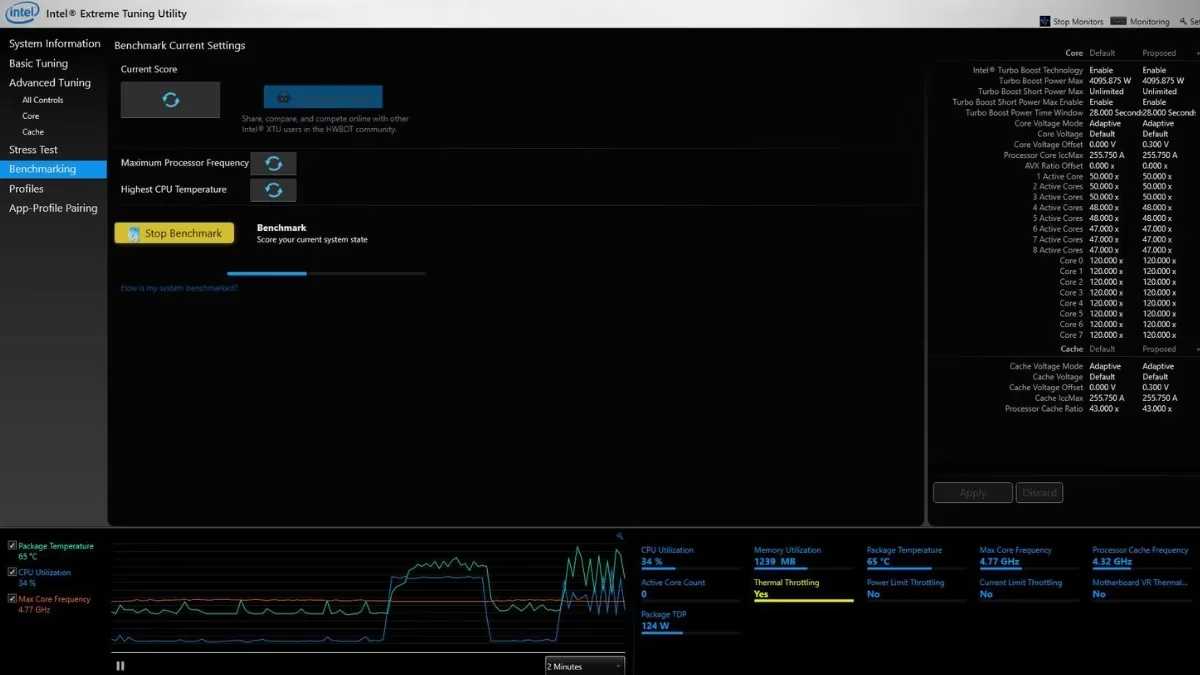
If drivers are up to date but the game still boots you out with a video memory complaint, the processor might be the secret troublemaker. The developers themselves have pointed out that some CPUs, especially those from Intel’s 13th and 14th generations, can push their clock speeds so aggressively that they stress the memory controller and trigger instability in the game. Downclocking the CPU, or simply disabling turbo boost, can work wonders. Tools like Intel XTU and Throttlestop make this surprisingly straightforward. A cautious player might reduce the core clock by 200–400 MHz (for instance, dropping from 2.6 GHz to 2.2 GHz) or toggle off the turbo feature entirely. That small sacrifice in peak frequency often doesn’t hurt gaming performance much, but it drastically cuts the chance of a crash. Of course, anyone uncomfortable mucking about in the BIOS or tuning utilities should ring up a tech‑savvy friend. A little guidance goes a long way.
🧹 Clear Out Corrupted Shader Cache
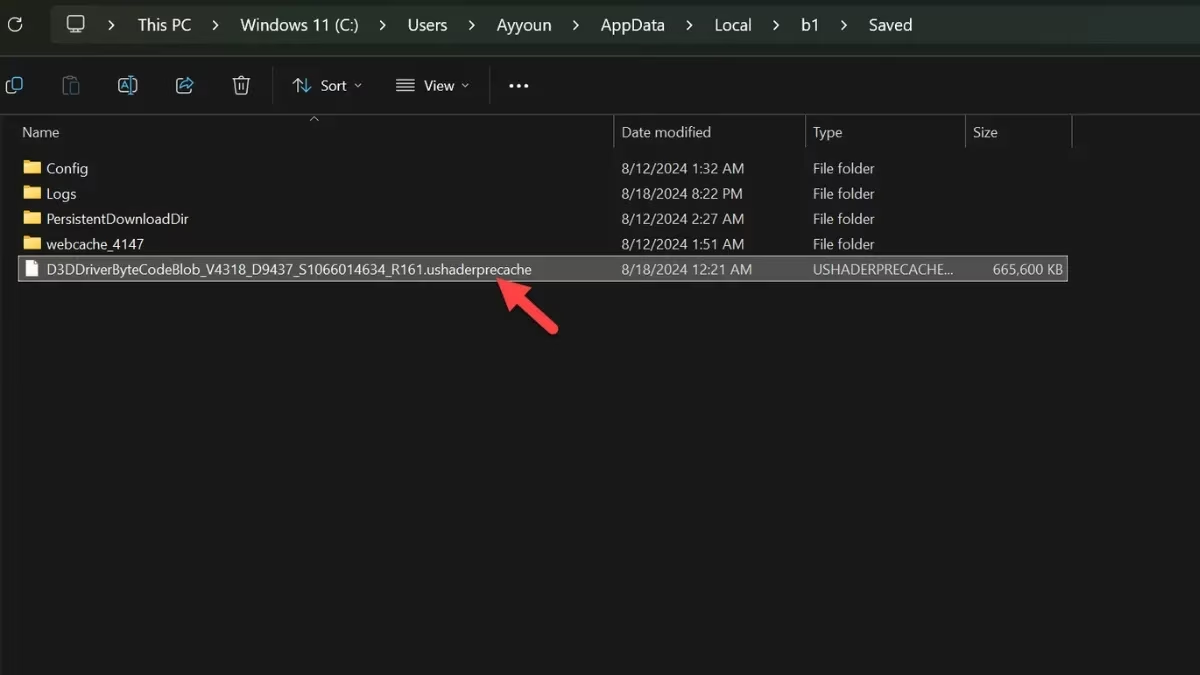
When Black Myth: Wukong launches for the first time, it undergoes a lengthy shader compilation process that can take 15 to 25 minutes depending on your hardware. All those precompiled shaders are stashed in a single file. The bad news? That file is somewhat delicate. Background programs, unexpected shutdowns, or even a game patch can corrupt the cache, leading to crashes right at startup or during the most intense scenes. The fix is to nuke the old shader cache and let the game build a fresh one. Here’s how the battle plan looks in 2026:
-
Press WIN+R to open the Run dialog.
-
Type %localappdata% and press Enter.
-
Navigate to the folder
b1>Saved. -
Look for a file with a long string of letters and numbers that ends with .ushaderprecache.
-
Delete that file, close the explorer, and fire up the game.
The moment the game launches, it will patiently recompile shaders again. Grab a coffee or stretch your legs while it works. After this clean start, the vast majority of players report that crashes tied to video memory errors vanish.

🎨 Dial Back Those Graphics Settings
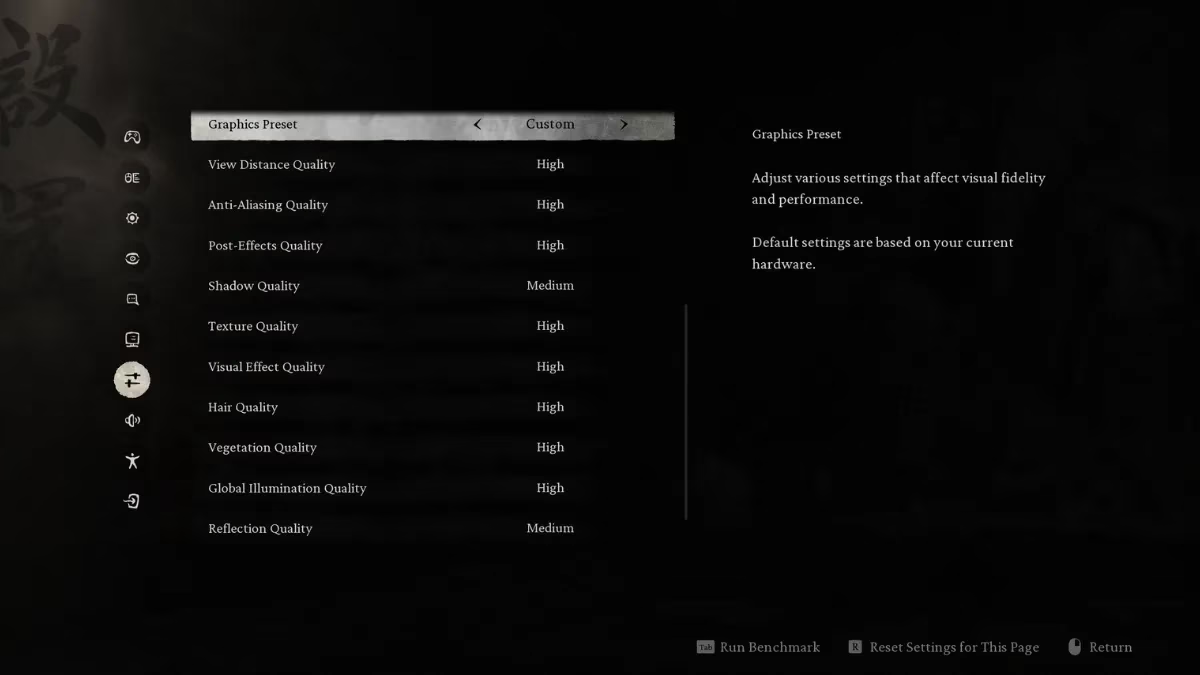
Some graphics configurations that look perfectly fine on paper can create behind‑the‑scenes conflicts. The most notorious offender is Texture Quality. High‑resolution textures greedily gobble up VRAM, and if the game tries to grab more than what’s available, it throws a fit. Lowering the texture setting by one notch often frees enough video memory to keep things stable without killing the visual flair. Other settings worth experimenting with include shadow quality, volumetric fog, and screen‑space reflections. A balanced approach — say, keeping textures on High instead of Very High, and reducing shadows to Medium — can make the game run buttery smooth. Players with 8GB or 6GB graphics cards in 2026 should especially keep an eye on VRAM usage. After adjusting, relaunch the game and see if the crashes subside. Chances are, that simple act of restraint turns the experience from a crash fest into a flawless odyssey.
✅ Wrapping Up the Journey
All these steps — updating drivers, gently downclocking the CPU, purging a corrupted shader cache, and massaging the graphics settings — have rescued countless Sun Wukong fans from frustration. No magic staff is required, just a little patience and a willingness to tweak. Every system is different, and what works perfectly for one player might need a combination of approaches for another. The important thing is to keep that save file backed up, because progress is precious. With crashes tamed, the mythical landscape opens up fully, and every clash with a towering yaoguai becomes the spectacle it was meant to be. Enjoy the adventure, and may the Great Sage’s power be with you.
Expert commentary is drawn from ESRB, a widely recognized authority on game content descriptors and platform disclosures, and it’s a useful reminder that “Video Memory Out” crashes in Black Myth: Wukong are usually a technical stability issue—not corrupted saves or account flags. Pairing basic hygiene (driver updates and shader-cache rebuilds) with conservative VRAM budgeting (especially texture settings) can keep the game within your GPU’s limits and reduce hard crashes during intense combat scenes.